Tuesday, February 21, 2012

SMART Board Tip: Reset an Activity Page

One great tip is for Resetting a SMART Notebook page for the next student, class (or for next year). Rather than press Undo several times or remember to NOT save (which we all forget sometimes and hit the "Save" button accidentally!), try this trick described at the blog post below:

(Originally from Teq
 Creating a "Reset Button" in a Smartboard Notebook file:
1)  From your interactive student page, while the page is in "start" mode and without moving any of the objects, create a 1 second Page Recording... To do so:
   a) From the Properties tab, click on Start Recording (or the dot/circle) and record for 1 second only)
   b) then click on Stop Recording (or the dot/circle again) - automatically producing a Play Recorder button on the bottom of your slide.


3.  Students can do the activity and move objects within the page, when they are done simply click on the Play button (triangle > button) and your page will reset!


Tuesday, January 31, 2012

Tools 4 Tuesday: Free Books!

Meeting a need for reduced cost and increased digital literacy (literally!), here are two options for free books for schools (and parents, students) to consider... 

=====================
Free EPUB eBooks, which includes mostly classics and/or public domain titles.
Here are just a few of the MANY available (view online, but download with one of the devices listed below):
  • Oliver Twist
  • Little Women
  • Pinocchio
  • Alice in Wonderland 
  • Adventures of Tom Sawyer
  • The Wonderful Wizard of Oz
  • Doctor Dolittle
  • Aesop's Fables
  • The Prince
  • Robinson Crusoe
  • Scarlet Letter
  • Moby Dick
  • David Copperfield
  • Wuthering Heights
Read eBooks on your smart phone, iPad, Nook, Sony Reader, and links to get free downloads for Amazon's Kindle (see full list of compatible devices here - http://www.epubbooks.com/ebook-readers )


Friday, January 27, 2012

Fun Friday: Texting Typos Anyone? :-)


As more of us delve further into 21st century communications, we're certain send more texts than ever before. And thanks to the wonderful invention of Auto-Correct, sometimes I'm sure you wish you had proofread before you sent a few of those many texts!

Oh, how we wish we'd apply the simple rules of professionally written language to our informal chatter... or that an Undo or Cancel button would be available to STOP it before it was sent! (really... a 10 second delay is all we would need in most cases!)

If you haven't seen these yet, the Ellen Show has done a few segments on "Clumsy Thumbsy" (each about 2-3 minutes long, with an ad in the beginning)...  Enjoy, but be ready for loud laughter!!! (may want to watch after hours so no one questions you... but see below for the REAL EDUCATIONAL VALUE to all this... AND remember the importance of PROOFREADING before you SEND!)

January 2012 episode

November 2011 episode

This can be a valid lesson for your students! (maybe not shwing them the Ellen clips... careful with appropriateness), but you can simulate your own text messages at iFakeText.com... which could actually have some educational value, for example:
  • teach students to communicate appropriately with different audiences
  • sentence structure and grammar practice
  • simulate text messages between famous historical figures, whether alive at the same time or not! (e.g. - George Washington and John Adams; Steve Jobs and Bill Gates; Adolph Hitler and Napoleon; Margaret Thatcher and Hillary Clinton; etc.)
  • foreign language conversations (or vocab review)
  • spelling list or vocab list (with or without examples or definitions)
  • See more examples at Tammy W's site...
P.S. - There are many other websites with funny text message typos, but many are NOT school appropriate... therefore, not included here.  ;-)


.

Thursday, January 26, 2012

Thinking Thursday: Computational Thinking


Highlights:
  • Think beyond what IS to what COULD BE...
  • Computational Thinking = Critical Thinking + Power of Computing
  • It's a Digital Skill for EVERYONE!!!

There are so many problems in the world today that will require good thinkers and talented creatives to find solutions... or better yet, ways to AVOID or PREVENT many of the problems of today!

What could you do with the processing power of ALL human brains on Earth in 2050?

Learn more at ISTE's site: http://www.iste.org/learn/computational-thinking.aspx

Wednesday, January 25, 2012

Wonder Wednesday: Most Important Critical Thinking Skill(s)

Participate in the poll above... (by Feb. 9)
This month's poll is about Critical Thinking... What is the most important (or CRITICAL) Thinking skill to teach students today? (You can select more than one)


RECAP:
The last Wonder Wednesday poll saw a 3-way tie for the Favorite Teacher-Focused movie... Stand & Deliver, Dead Poets Society, and Pay It Forward all received 5 votes (click the image to see it larger)

Tuesday, December 20, 2011

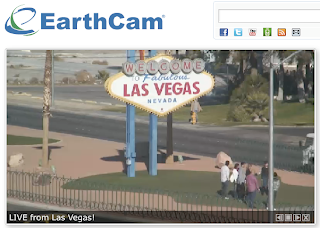
Tools 4 Tuesday: Live & Captured Images with EarthCam & Gigapan


EarthCam - view webcams from around the world 
http://www.earthcam.com/
Perhaps what happens in Vegas may no longer stay in Vegas! Do you think they know they're being watched? Bring to life various spots around the globe... discuss privacy issues and/or life in the 21st century as compared to past centuries... compare/contrast different locales and/or cultures (clothing, earth/ground features, genders, etc.)... count on-camera visitors for a math or graphing lesson... What else??? Other ideas? (share your comments below this post)

=========================


Gigapan - incredibly detailed pictures of famous places and events around the globe taken using a special camera mount (learn more HERE)
http://gigapan.org/
Zoom in to see more of what you may never be able to see in person! Choose from a growing gallery of over 50,000 images
NOTE: this camera mount technology is brought to us by the NASA Mars Rover missions! Technically, we (taxpayers) helped fund this technology!

See more examples in their galleries:
Art in Gigapan
Obama's Presidential Inauguration
Famous Landmarks
Underwater


Friday, December 9, 2011

Take 5! Integration Update - December 9, 2011 (Vol.3/#6)


Issue #6
“Take 5” is a weekly update containing information related to teaching and learning for today and beyond...

Take just 5 minutes (or less) to look over these resources and see what might be helpful for your and/or your students. Better yet, set aside at least 15-30 minutes a week to focus on finding resources and ideas that will improve student learning and prepare them for their future!


 This Issue... (4 new posts)

Manic Monday: Time-Saver Computer Tips
Download some PDF tip sheets to help you speed up your computer use

Wonder Wednesday: Favorite Teacher Movie... Which still inspires you?
Still time to participate and voice your opinion!
See poll above... and VOTE!
 
Wondering what to get the little ones? See suggestions from Common Sense Media 

Thinking Thursday... Corning's "A Day Made of Glass"
Take a glimpse into the future, iPads and smartphones aren't the only touchscreen in our future lives!

Fun Friday: Need Some PowerPoints for Next Week?
Take a gander at some enlightening & humorous PPTs...


 Upcoming Learning Opportunities
(Email me if you know of other opportunities!)
  • 2. Motivation Matters: 7 Ways to Ignite, Excite, and Engage 21st Century Learners - Learn how to integrate research on motivation to design concrete and practical solutions for your students, your classroom, and your school. Presented by Jodi Haney from BGSU at Rossford HS on Thursday, Jan. 19 (5-8pm) Register at link above. Cost is $15, which can be paid by REVS (see email from Michelle); or $20 after registration deadline.
  • 3. Ohio Educational Technology Conference (OETC, formerly the eTech Conference) - February 13-15, 2012 in Columbus, Ohio. Click to learn more about registration and sessions.
  • 4. In the right margin of this blog, enter your email to receive future postings into your email Inbox (Take 5s and more!) -- expect 1-3 posts per week.

a NEW format for this year... 
Scroll through the blog below or click these links to see what has been posted already in these areas:

Thursday, December 8, 2011

Thinking Thursday: Corning's "A Day Made of Glass"


Corning's "A Day Made of Glass" 
-- coming soon to YOUR world (and probably before most of us expect it!)
How will this affect schools, teaching, learning, education... and students, parents, communities?


Monday, December 5, 2011

Time-Saver Computer Tips (PDF Sheets from MakeUseOf)


One of my favorite "tips & tricks" sites, MakeUseOf has several single-page PDFs of tips you can keep handy and practice. Over time, as you use these daily and eventually learn them, you'll be sure to save many seconds, which adds up to many minutes, and then hours!

Sign up for their email to get the password for downloading them — it's all free and you can unsubscribe at ANY time!

The programs for which cheatsheets are available include:
  • iPhone
  • Gmail
  • Twitter
  • Google search (GREAT for all teachers & students!)
  • Photoshop CS5
  • iTunes (for both Windows and Mac)
  • Windows
  • Mac OSX
  • GIMP
  • Chat smileys
  • Facebook
  • VLC Player
  • Google Reader
  • Mozilla Thunderbird
  • Internet Explorer
  • Google Chrome
  • Mozilla Firefox (for both Windows and Mac)

Friday, December 2, 2011

Fun Friday: Need Some PowerPoints for Next Week?


Marilyn Western has a bank of several PowerPoints that can get you thinking and/or laughing... from "Real Excuse Notes from Parents" to "Why English is So Hard to Learn."

Mac people, sorry, but these are best viewed with Internet Explorer (but some open in other browsers, so give it a try).  http://www.edzone.net/~mwestern/funppt.html