Showing posts with label Visuals. Show all posts

Tuesday, April 24, 2012

Tools for Tues: Livebinders & Infographics

Here are two tools that are visual AND help us organize information, which is an essential skill today and well into the future...


LiveBinders - although not a new "tool", this may be an alternative for teachers or students to save websites, PDFs, videos, images and more to one location... Here are some possible uses:
  • bookmark/favorites alternative
  • eportfolio
  • online presentation resource (alternative to PowerPoint)
  • collaborative resources space (share with colleagues and all add to it)
===============================
 
And take a look at this sample LiveBinder on Infographics -- the FUTURE of presenting/sharing information!


Learn more! Here are some more resources on InfoGraphics...
Visual.ly - a website dedicated to visual expression of data and information... Explore, share, and create here!

Infographics App — An app for finding infographics


Tuesday, April 3, 2012

Tools 4 Tuesday: SMART Board Thinking Games, Audio Books & eBooks, and Interactive Maps


Librivox: Free books site (eBook links & Audio recordings of book readings) - books from public domain

======================


Cool Interactive Map Website
http://show.mappingworlds.com/usa/

Choose from the U.S., World, or Japan... "Select a subject from the top menu and watch the countries on the map change their size. Instead of land mass, the size of each country will represent the data for that subject --both its share of the total and absolute value."
 
======================
 
 SMART Board Logic Games
(Re-shared from Teachers Love SMART Boards)
Here are five strategy games that Teachers Love SMART Boards blog best qualified as "educational." You can click these links to view and/or download these SWF files which can be inserted onto a SMART Notebook slide/page.

1. Peg SolitareJump over other pegs until all the pegs are removed from the board.


2. ShotTry to knock other balls off the grid. Be careful you don't leave a ball alone on the grid.


3. Code MasterThis is my favorite game. You have to assign a number from 1 – 9 to a letter to break the code. This game uses handwriting recognition to recognize the numbers that are written. It works very well although it struggled a few times trying to recognizing my number 8.


4. Recognizer This is another number recognition activity where students can write in the answer to a two-digit addition problem using the SMART Board pen or their finger and the activity will recognize what number they wrote.


5. Tacoyaki - Click tiles to change the color of the surrounding tiles trying to get all the tiles the same color.


Tuesday, December 20, 2011

Tools 4 Tuesday: Live & Captured Images with EarthCam & Gigapan


EarthCam - view webcams from around the world 
http://www.earthcam.com/
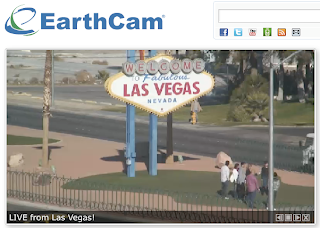
Perhaps what happens in Vegas may no longer stay in Vegas! Do you think they know they're being watched? Bring to life various spots around the globe... discuss privacy issues and/or life in the 21st century as compared to past centuries... compare/contrast different locales and/or cultures (clothing, earth/ground features, genders, etc.)... count on-camera visitors for a math or graphing lesson... What else??? Other ideas? (share your comments below this post)

=========================


Gigapan - incredibly detailed pictures of famous places and events around the globe taken using a special camera mount (learn more HERE)
http://gigapan.org/
Zoom in to see more of what you may never be able to see in person! Choose from a growing gallery of over 50,000 images
NOTE: this camera mount technology is brought to us by the NASA Mars Rover missions! Technically, we (taxpayers) helped fund this technology!

See more examples in their galleries:
Art in Gigapan
Obama's Presidential Inauguration
Famous Landmarks
Underwater


Tuesday, November 22, 2011

Tools 4 Tuesday: PicLit & Build Your Wild Self!


PicLits – Inspired Picture Writing
http://www.piclits.com/
Grades 2-12+
====================


Build Your Wild Self - Build yourself out of various animal parts! Great for creative writing, animal traits, adaptation, etc.


Tuesday, August 30, 2011

TOOLS 4 Tuesday: 1-Page Map Maker & Teacher's Tape


National Geographic’s 1-Page MapMaker 
(in beta or test-version, so may not function perfectly, but still can be a great resource!)
"Customize one-page maps and download, email, print, or share!"
(OR... Use on your SMART Board, just capture the map with your Image Capture tool and use!)

 
 _____________________________________________
 
 
Teacher's Tape
Foam tape for wall hangings, magnetic tape, non-stick tape for shelves, and more! 

As the year begins, classrooms are still taking shape. Why not use an alternative to tape that stays up longer and is safer for most surfaces. I've used this before and found it to be a better option on some wall surfaces. NOT FREE :-( ... but you can get a FREE SAMPLE.

Tuesday, April 19, 2011

Take 5! Integration Update - April 19, 2011 (Vol.2/#23)


Issue #23
“Take 5” is a weekly update containing information related to teaching and learning for today and beyond...

Take just 5 minutes (or less) to look over these resources and see what might be helpful for your and/or your students. Better yet, set aside at least 15-30 minutes a week (yes, that's been increased from last year!) to focus on finding resources and ideas that will improve student learning and prepare them for their future!

===================================

Tips and Tools for Teachers
  • Grant Resources Ohio Dream Sources... Make your classroom dream come true!
  • Google Earth Resources (wiki) A great resource for Google Earth, which can be used in practically every classroom (some with more creativity than others) -- geography, history, social studies, literature tours, virtual street level tours, topography, earth science, space, moon, Mars, sky/stars, and more! Take a look at what Google Earth can do, then see if you have a lesson/objective that this tool can help students learn. Here's the Google Earth Showcase to learn more.
 

Ponderings
  • Ed-Tech Quotes (Slideshow by solejea2 ) - Check out this Scribd slideshow... Should make you go "Hmmmmm" a little...
    (Hopefully this is not blocked, but if so, try it from home... it's worth it!)
Ed Tech Quote Slideshow


Learning Opportunities
  • 1. In-District Professional Development Opportunities
  • 2. Cyberbullying, Harassment, and Sexting: What’s a District to Do? April 20, 2011
     at Lucas Co. ESC. More information below... Check REVS email for registration sheet or email Carrie
  •  3. In the right margin of this blog, enter your email to receive future postings into your email Inbox (Take 5s and more!) -- plan on 1-3 posts per week.
-------------------------------------
Cyberbullying, Harassment, and Sexting: What’s a District to Do?
April 20, 2011
4:30-6:30pm (1.5 contact hours)
At Lucas County ESC   
Presented by
Margaret J. Lockhart, Esq.
Cooper & Walinski, LPA

With the increased use of social media and cell phones, bullying has moved from beyond the schoolyard and into students’ homes. Cyberbullies can anonymously and instantaneously disseminate cruel and malicious information or compromising photographs, often leading to tragic results for victims. Parents want schools to take action, but most cyberbullying and sexting takes place off campus. And perpetrators rely on the First Amendment to protect their conduct. This session will explore how school districts can respond to complaints of cyberbullying and sexting without infringing on students’ rights or increasing the district’s risk of liability.

Lucas County Educational Service Center
2275 Collingwood Boulevard
Toledo, Ohio 43620


;-) Just for Fun?!?! (and a little learning, perhaps)

¿uʍop ǝpısdn ƃuıʇıɹʍ ʇnoqɐ noʎ llǝʇ ı pıp ʇɐɥʍ 

 Flipped Text... Do you have a use for this? (other than confusing people) The text is still recognized as text (can change font, size, etc.), but spell check gets VERY confused!! (see images below)


--------------------- 


Wednesday, March 30, 2011

Take 5! Integration Update - March 30, 2011 (Vol.2/#21)


Issue #21
“Take 5” is a weekly update containing information related to teaching and learning for today and beyond...

Take just 5 minutes (or less) to look over these resources and see what might be helpful for your and/or your students. Better yet, set aside at least 15-30 minutes a week (yes, that's been increased from last year!) to focus on finding resources and ideas that will improve student learning and prepare them for their future!

===================================

Tips and Tools for Teachers


    • Web 2.0 by Steve Dembo (from Discovery Education)
    • Project Based Learning by Jackie Gerstein, PhD
    • Infographics by thomesss -- great for visual literacy (some may not be appropriate for students... preview first! Then save image.)
    • Teenagers? What's That?! by rougier marie -- “Everything to understand this strange breed, even if you're an adult.”

More on Scoop.It!...
Scoop.It! is currently in “beta” (testing phase), so it’s not widely being used yet... But I have a hunch it will be pretty big soon! Imagine the uses for teachers, students, school districts... Pick a topic and find information on the web that applies, then share it on your Scoop.It page! 
 
Like many other Web 2.0 tools, it allows you to “follow” other “scoopers’” topics and even leave a comment (reaction). They use the term “curating” information, but I compare it to being your own editor of what you find pertinent, timely, or interesting to share with others (or just to keep a record or or bookmark). 


Other Topics will return next time...


Tuesday, March 1, 2011

Mind Maps for Critical Thinking (free downloads)

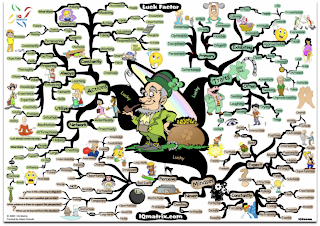
Using the sample image above (of the "Luck Factor Mind Map"), think about how your students could benefit from some of these interpretations (or deciphering them or creating their own)? Check out some mind-maps HERE and download them for free. These maps are good for critical-thinking or analysis practice with visual information.

There's even a "MasterMind Matrix Chart" that "will guide you step-by-step towards success and achievement in any field of endeavor. It makes for an ideal self-coaching tool for any problems or challenges that may stand between you and your life’s objectives." ... Sounds like we all need to follow that!!!

Some good tools for map creation include: Inspiration , Kidspiration (REVS has licenses for these),  Cacoo, or Bubbl.us... plus MANY more you can pay good money for!


Monday, January 10, 2011

Cleaner Simpler YouTube Viewing

These sites present YouTube videos with less or even no clutter... 

YouTube XL
-- Just a larger version with less clutter (from YouTube themselves); still shows some related videos on the side... Not sure if “inappropriate ones” will still show up or not (I didn’t know what to try to test it!)


quietube - (follow directions at this site)
-- Add the box to your bookmark/favorites tab, then click it to view YouTube as a “QUIETube” -- Watch this video (1 min.) to see exactly what quietube does.

Tuesday, October 20, 2009

Scrapblog - Creativity & Creation Tool


Try using Scrapblog for one or more of your creation tasks -- Better yet, ask your students to give it a try! It has a free option and is fairly easy to start and quick to learn. To view some other educational examples, check these out: