Wednesday, March 30, 2011

Take 5! Integration Update - March 30, 2011 (Vol.2/#21)


Issue #21
“Take 5” is a weekly update containing information related to teaching and learning for today and beyond...

Take just 5 minutes (or less) to look over these resources and see what might be helpful for your and/or your students. Better yet, set aside at least 15-30 minutes a week (yes, that's been increased from last year!) to focus on finding resources and ideas that will improve student learning and prepare them for their future!

===================================

Tips and Tools for Teachers


    • Web 2.0 by Steve Dembo (from Discovery Education)
    • Project Based Learning by Jackie Gerstein, PhD
    • Infographics by thomesss -- great for visual literacy (some may not be appropriate for students... preview first! Then save image.)
    • Teenagers? What's That?! by rougier marie -- “Everything to understand this strange breed, even if you're an adult.”

More on Scoop.It!...
Scoop.It! is currently in “beta” (testing phase), so it’s not widely being used yet... But I have a hunch it will be pretty big soon! Imagine the uses for teachers, students, school districts... Pick a topic and find information on the web that applies, then share it on your Scoop.It page! 
 
Like many other Web 2.0 tools, it allows you to “follow” other “scoopers’” topics and even leave a comment (reaction). They use the term “curating” information, but I compare it to being your own editor of what you find pertinent, timely, or interesting to share with others (or just to keep a record or or bookmark). 


Other Topics will return next time...


Tuesday, March 22, 2011

Take 5! Integration Update - March 22, 2011 (Vol.2/#20)


Issue #20
“Take 5” is a weekly update containing information related to teaching and learning for today and beyond...

Take just 5 minutes (or less) to look over these resources and see what might be helpful for your and/or your students. Better yet, set aside at least 15-30 minutes a week (yes, that's been increased from last year!) to focus on finding resources and ideas that will improve student learning and prepare them for their future!

===================================

Tips and Tools for Teachers

  • Study Skills for Students – Just what students want to think about right before Spring Break -- study skills... "Yeah!!!" But this site contains great information for students, parents, and teachers to help students 1) study, 2) "learn how to learn," and 3) help themselves be successful!

  • Mathmaster for basic/elementary math, this site allows you to quickly create PDF worksheets in a snap for student practice or assessment. It also has links to videos (click the Videos tab) from Khan Academy on subjects such as: math (LOTS), economics, finance, history (limited), and various sciences (chemistry, astronomy, physics, biology) -- Thanks for sharing this, Josh M.!
      
Ponderings
  • Ed Tech Quote Slideshow- from "solejea2" on Scribd - VIEW SHOW
    ... Spend a few minutes looking through this slideshow and reflect on how it relates to your subject area/grade level, your students, and how you teach both.
Learning Opportunities

;-) Just for Fun?!?! (and a little learning, perhaps)

Got Time? How about creating your own time-lapse video! Oh, what creative people share videos on YouTube... Over 12 million viewers have seen these, but just in case you were not one of them...
Here are some classics based on video game classics, PacMan and Tetris. 

Could your students create something similar about a process, sequence, or historical event you want them to learn?


Wednesday, March 9, 2011

Take 5! Integration Update - March 9, 2011 (Vol.2/#19)


Issue #19
“Take 5” is a weekly update containing information related to teaching and learning for today and beyond...

Take just 5 minutes (or less) to look over these resources and see what might be helpful for your and/or your students. Better yet, set aside at least 15-30 minutes a week (yes, that's been increased from last year!) to focus on finding resources and ideas that will improve student learning and prepare them for their future!

===================================

Tips and Tools for Teachers


  • Wigflip (image goodies) For SMART Notebook files, Word documents, PowerPoint presentations, etc.... Make your own...
    • Sticky Note
    • Tiny Tags (sales tags)
    • Speech Bubble
    • Sign Bot (an animate LED sign)
    • Street Sign
    • Motivational Poster

  • Office & Word 2007 Tips Click HERE for a PDF handout from the recent session on 10+ tips to save you (or your students) time... so you can spend that on more important things like teaching and student learning! Included are handy things such as...
    • Customize the Quick Access Toolbar
    • Split document (great for making Table of Contents or reference lists in large documents)
    • Thumbnail view of your pages
    • Copy/Paste text formatting
    • Using highlighting text for student handouts or visuals
    • Adding Smart Art (graphic organizers)
  • For Mac Users: Right-Click Tips HERE is a list of 15 uses for the right-click on a Mac (also known as Control+Click... hold down the Control key while clicking on an item or link, etc.). At least 3 of these are VERY HELPFUL for any and all Mac users.

Ponderings
Learning Opportunities
  • 1. In-District Professional Development Opportunities
    • >>> SMART Board Tips - Th. 3/10 @ HS (3-3:30)
    • >>> SMART Board Tips - Fri. 3/11 @ IH (8-8:30)
  • 2. NWO's STEM Education Inquiry Series (at Rossford High School!) - Thurs., March 24th (from 5-8pm) a low-cost, local opportunity for elementary teachers and JH/HS science, math, and technology teachers offered 7 times from September 23 - April 14, 2011.
  •  3. In the right margin of this blog, enter your email to receive future postings into your email Inbox (Take 5s and more!) -- plan on 1-3 posts per week.

;-) Just for Fun?!?! (and a little learning, perhaps)

Easy one today... just read the post listed above -- Notice to All Banker-Types From a Teacher

Wednesday, March 2, 2011

Take 5! Integration Update - March 2, 2011 (Vol.2/#18)


Issue #18
“Take 5” is a weekly update containing information related to teaching and learning for today and beyond...

Take just 5 minutes (or less) to look over these resources and see what might be helpful for your and/or your students. Better yet, set aside at least 15-30 minutes a week (yes, that's been increased from last year!) to focus on finding resources and ideas that will improve student learning and prepare them for their future!

===================================

Tips and Tools for Teachers
  
  • Hippocampus Online curriculum, videos, textbooks... From their site: "HippoCampus is a project of the Monterey Institute for Technology and Education (MITE). The goal of HippoCampus is to provide high-quality, multimedia content on general education subjects to high school and college students free of charge."
    • Some topics/subjects:
      • Algebra (English & Spanish)
      • American Govt
      • Biology
      • Calculus (English & Spanish)
      • Environmental Science
      • Physics
      • Psychology
      • Religion
      • Statistics 
      • US History


  • Grammaropolis – A site full of grammar review games and lessons for elementary or even middle school students. Wondering how to use this site in your classroom, here are some suggestions from Kelly Tenkely's iLearn blog. 


    Ponderings
    •   
      (Book & Website) Fires in the Mind: What Kids Can Tell Us About Motivation and Mastery (by Kathleen Cushman)
      Some important messages here about student motivation, effort, practice, and mastery... 
      (About the importance of connecting with students... From a student) - "If no one's going to notice what you're doing, it doesn't matter whether you push yourself. But if the teacher develops a connection with you, you don't want to disappoint them.

      (About effort... From a student) - "Everything takes practice. It's not like one day you can just get up and say, 'I'm going to do something.' You got to practice it."
      Goals Checklist for student practice in class - developed by students
      Homework advice from students (this link is to the entire Ch. 8, which includes the HW advice, alternative HW assignments, and the difference between HW and "deliberate practice")
    Learning Opportunities
    • 1. In-District Professional Development Opportunities
    • 2. NWO's STEM Education Inquiry Series (at Rossford High School!) - Thurs., March 24th (from 5-8pm) a low-cost, local opportunity for elementary teachers and JH/HS science, math, and technology teachers offered 7 times from September 23 - April 14, 2011.
    •  3. In the right margin of this blog, enter your email to receive future postings into your email Inbox (Take 5s and more!) -- plan on 1-3 posts per week.

    ;-) Just for Fun?!?! (and a little learning, perhaps)
    • Wait Wait... Don't Tell Me! - (from their site...) "NPR's weekly hour-long quiz program. Each week on the radio you can test your knowledge against some of the best and brightest in the news and entertainment world while figuring out what's real news and what's made up." Or try their daily quiz HERE
      

    Tuesday, March 1, 2011

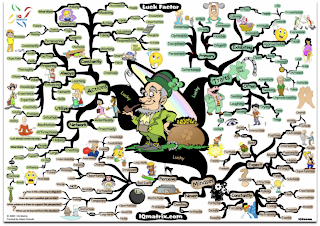
    Mind Maps for Critical Thinking (free downloads)

    Using the sample image above (of the "Luck Factor Mind Map"), think about how your students could benefit from some of these interpretations (or deciphering them or creating their own)? Check out some mind-maps HERE and download them for free. These maps are good for critical-thinking or analysis practice with visual information.

    There's even a "MasterMind Matrix Chart" that "will guide you step-by-step towards success and achievement in any field of endeavor. It makes for an ideal self-coaching tool for any problems or challenges that may stand between you and your life’s objectives." ... Sounds like we all need to follow that!!!

    Some good tools for map creation include: Inspiration , Kidspiration (REVS has licenses for these),  Cacoo, or Bubbl.us... plus MANY more you can pay good money for!


    Wednesday, February 23, 2011

    Take 5! Integration Update - February 23, 2011 (Vol.2/#17)


    Issue #17
    “Take 5” is a weekly update containing information related to teaching and learning for today and beyond...

Take just 5 minutes (or less) to look over these resources and see what might be helpful for your and/or your students. Better yet, set aside at least 15-30 minutes a week (yes, that's been increased from last year!) to focus on finding resources and ideas that will improve student learning and prepare them for their future!

    ===================================

    Tips and Tools for Teachers

    • Life.com The Power of Historical Images – (Perfect for Black History Month) Begin a discussion with this collection of photos from Life.com — or have students use them to create a presentation or expository piece on a segment of history. Show an image with no captions and have students discuss what they think is going on. So many ideas you can come up with from images here. Getty Images purchased the rights to Life’s photos and has made them available for use at Life.com.  More information can be found at this Edutopia article. (NOTE: The site also includes "Today's Top Photos" on their home page -- watch history being made in the Middle East/North Africa) 
     

    • Flashcards – (see sample quiz item above) From Dictionary.com, create your own study guide or use one already made — works great for vocabulary in any subject, foreign language, or anything else that has one right answer. (Thanks to Kathy Herman, HS, for this tip!)

    Ponderings
    • Teacher Blogging or Venting? (article) - PA teacher strikes nerve with 'lazy whiners' blog
      ... If you are a blogger (or know of any teachers who blog in any form), take a quick look at this article and consider the implications. This teacher occasionally used her personal blog to vent her frustration with her students' lack of motivation, and more. She claims "free speech," but even "free" often has hidden costs! Here are some excerpts from the article:
      • "My students are out of control," Munroe, who has taught 10th, 11th and 12th grades, wrote in one post. "They are rude, disengaged, lazy whiners...
      • Munroe did not use her full name or identify her students or school in the blog, which she started in August 2009 for friends and family. Last week, she said, students brought it to the attention of the school, which suspended her with pay.
      •  "She could have been any person, any teacher in America writing about their lives," he said, pointing out that Munroe blogged about 85 times and that only about 15 to 20 of the posts involved her being a teacher. "It's honest and raw and a little edgy depending on your taste. ... She has a deep frustration for the educational system in America."
    Learning Opportunities
    • 1. In-District Professional Development Opportunities
    • 2. NWO's STEM Education Inquiry Series (at Rossford High School!) - Thurs., March 24th (from 5-8pm) a low-cost, local opportunity for elementary teachers and JH/HS science, math, and technology teachers offered 7 times from September 23 - April 14, 2011.
    •  3. In the right margin of this blog, enter your email to receive future postings into your email Inbox (Take 5s and more!) -- plan on 1-3 posts per week.

    ;-) Just for Fun?!?! (and a little learning, perhaps)

    Another set of gems from the photos at Life.com... Called "Heavy Stuff on Top of People," this could be used for a science/physics lesson, perhaps? (visuals only, no demonstrations or experiments!) People REALLY did stuff like that back then too, huh? Remember... do NOT try these at home!!!
      

    Monday, February 7, 2011

    Take 5! Integration Update - February 7, 2011 (Vol.2/#16)


    Issue #16
    “Take 5” is a weekly update containing information related to teaching and learning for today and beyond...

Take just 5 minutes (or less) to look over these resources and see what might be helpful for your and/or your students. Better yet, set aside at least 15-30 minutes a week (yes, that's been increased from last year!) to focus on finding resources and ideas that will improve student learning and prepare them for their future!

    ===================================

    Tips and Tools for Teachers 

    • NewsMap Ever wish you could see all the news at once? Well, you can (sort of)... Sorted by size, color, and hue, NewsMap represents the current news in several countries (and languages) across the globe in these disciplines: World, National, Business, Technology, Sports, and Health. Great for current events, history in the making, sociology, or even just to see what news event is the most or least popular. (NOTE--this site may take a few seconds to load; may not work on older computers) 
      • The image below shows what was happening Monday, February 7th -- the day after the Superbowl... thus the big area about the Packers' rings! The Egypt crisis has also gotten a lot of press, so that also takes up a larger than normal size on the NewsMap.


    • Big Huge Labs – "Do fun stuff with your photos" or as we educators like to say, "Do educational things with your photos!" A Flickr account allows you to use more of these tools, but some photos can be uploaded. Not all of their tools are educationally adaptable, but here are a few to think about...
      • ID badges for cooperative group roles, "about me" activity, famous/historical people/biographies, shapes information, or book characters... 
      • Image Cubes for review games (topics), similarities and differences, cooperative group roles (roll to get your role!)... or a 
      • Magazine Cover for biographies, project visuals, guest speaker interest poster, portfolio cover, and more!
      • Motivational Poster of whatever you need to say (see above)

    Ponderings
    • 10 Things... Before My 1st  Job ... Ever wish someone gave you clear advice about teaching BEFORE you began? (Well, many probably did, but here's some more!) Some of these might be good reminders year after year. From the "So You Want to Teach" blog, here's a sampling:
      1. Get a handle on classroom management early
      2. Have fun
      10. Set aside personal time 
    Learning Opportunities
    • 1. In-District Professional Development Opportunities
    • 2. NWOCA's EdTech Training Schedule - learn more and sign up HERE
    • 3. NWO's STEM Education Inquiry Series (at Rossford High School!) - Thurs., February 17th - a low-cost, local opportunity for elementary teachers and JH/HS science, math, and technology teachers offered 7 times from September 23 - April 14, 2011.
    •  4. In the right margin of this blog, enter your email to receive future postings into your email Inbox (Take 5s and more!) -- plan on 1-3 posts per week.
    ;-) Just for Fun! (and a little learning, perhaps)
     
    • Dotty Dots - An interactive site of colored dots that interact with your mouse pointer or SMART Board touch. Try out the different scatter methods in the lower left. Make your own by entering your text at the top, then copy/paste the URL, like I did with this one.


    Thursday, January 27, 2011

    Take 5! Integration Update - January 27, 2011 (Vol.2/#15)


    Issue #15
    “Take 5” is a weekly update containing information related to teaching and learning for today and beyond...

Take just 5 minutes (or less) to look over these resources and see what might be helpful for your and/or your students. Better yet, set aside at least 15-30 minutes a week (yes, that's been increased from last year!) to focus on finding resources and ideas that will improve student learning and prepare them for their future!

    ===================================

    Tips and Tools for Teachers 

    • Got Goals? Try Joe's Goals A public goal-setting site for you and/or your students... for homework/studying goals, fitness, nutrition, or anything else you're trying to improve 
    • SMART Gallery Collections – Looking for more images for your lessons? Search and download new gallery collections for SMART Notebook at SMART Exchange. (This is updated regularly, so return to this link every month or two to see what SMART has added 


    Ponderings
    • Kids Today - Here's one perspective... from AVG, so the results (or survey pool of respondents) might be a bit skewed, but it gives some food for thought... or pondering... Some highlights:
      • Children on average have an online footprint by the time they are six months old.
      • More young children know how to play a computer game (58%) than swim (20%) or ride a bike (52%)
      • 28% of young children can make a mobile phone call, but only 20% know to dial 911 in case of an emergency
      • 69% of children aged 2-5 can operate a computer mouse, but only 11% can tie their own shoelaces 
    Learning Opportunities
    • 1. Ohio FreeTech Conference (hosted by SmartEd Services) - It's FREE and held in "Toledo" (Sandusky) (Jan. 25 & 26), Cincinnati (Feb. 2 & 3), Columbus (Feb. 9 & 10), and Cleveland (Feb. 17 & 18). Ashland grad credit is also offered. See the sessions HERE.
    • 2. Apply for National Board Certification by Jan 31st - Go HERE
    • 3. Ohio eTech Conference (Columbus, OH) January 31 - February 2
    • 4. NWO's STEM Education Inquiry Series (at Rossford High School!) - Thurs., February 17th - a low-cost, local opportunity for elementary teachers and JH/HS science, math, and technology teachers offered 7 times from September 23 - April 14, 2011.
    •  5. In the right margin of this blog, enter your email to receive future postings into your email Inbox (Take 5s and more!) -- plan on 1-3 posts per week.

    ;-) Just for Fun! (and a little learning, perhaps)

    • Need some R & R? Try doing nothing for 2 minutes! No, really... ABSOLUTELY NOTHING... give it a try at "Do Nothing for 2 Minutes" -- How did you do?
    SPECIAL NOTE... this site was just one of MANY new things I learned about while at the Ohio Free-Tech Conference over the last two days. More info will be coming about some great ideas and resources that presenters shared. Eventually, presenter's resources will be posted online and I'll leave a link to those as well. If you can, try to make one of the 3 other Free-Tech Conferences over the next few weeks or even the Ohio eTech Conference in Columbus, OH next week!  


    iPad Switch - Lock Position to Mute


    The switch on the side of the iPad used to lock the screen in either portrait or landscape position so it doesn’t flip-flop back and forth. As of the iOS 4.2 upgrade, the switch now acts as a mute switch to quickly turn off sounds. Both are fabulous features, of course, but how do you now lock your screen position, you ask? Here’s how... From Apple Support:

    Use the following steps to enable screen rotation lock: 
    1. Rotate iPad so the display is in the desired orientation.  
    2. Double-click the Home button to display recently used apps.
    3. Flick from left to right along the bottom of the screen.  
    4. Tap the rotation lock button on the bottom left of the screen.  
    5. A padlock will appear in the rotation lock button.
    Enjoy your new-found stability!

    Thursday, January 20, 2011

    Take 5! Integration Update - January 20, 2011 (Vol.2/#14)


    Issue #14
    “Take 5” is a weekly update containing information related to teaching and learning for today and beyond...

Take just 5 minutes (or less) to look over these resources and see what might be helpful for your and/or your students. Better yet, set aside at least 15-30 minutes a week (yes, that's been increased from last year!) to focus on finding resources and ideas that will improve student learning and prepare them for their future!

    ===================================

    Tips and Tools for Teachers 
    • Create Animations with Do Ink Have students animate a scientific process, narrate a story, or review math problems... or whatever else you or they think of! There's even a "Bazaar" that houses images or "Props" you can use... many are free, but some are for a fee.
    • Mac Tip: Screen Capture Image – I've been using the keyboard keys (Apple or Command + Shift + 4) to select an image or screen shot of various things to show teachers something, make a graphic for a test, worksheet, or project sample, or even to use on a web page. (NOTE: You can also use these keys... "Apple or Command + Shift + 3" to take a full shot of the entire page). These processes are nice, but each time, it will create a Picture file on your desktop. If you know you won't need to save that screen shot for later, consider this tip from Apple themselves -- it allows you to just Copy, then Paste the screen shot! Yeah!!! (Just add a 4th key, the Control key... Control+Command+Shift+3 (or 4)

    • Productivity Tip: Switch Quickly Between Programs – on a Mac or Windows PC, you can quickly switch between programs by using 2 keys and cycle through all open programs to quickly get to the one you want. 
      • On Windows/PC - press Alt+Tab (hold down Alt, then press Tab key once or several times to cycle through, letting go on the one you want) - VIDEO of this
      • On Mac - press Command(or Apple)+Tab (hold down Command, then press Tab key once or several times to cycle through, letting go on the one you want)

    Ponderings
    Learning Opportunities
    • 1. Ohio FreeTech Conference (hosted by SmartEd Services) - It's FREE and held in "Toledo" (Sandusky) (Jan. 25 & 26), Cincinnati (Feb. 2 & 3), Columbus (Feb. 9 & 10), and Cleveland (Feb. 17 & 18). Ashland grad credit is also offered. See the sessions HERE.
    • 2. Apply for National Board Certification by Jan 31st - Go HERE
    • 3. NWO's STEM Education Inquiry Series (at Rossford High School!) - Thurs., February 17th - a low-cost, local opportunity for elementary teachers and JH/HS science, math, and technology teachers offered 7 times from September 23 - April 14, 2011.
    •  4. In the right margin of this blog, enter your email to receive future postings into your email Inbox (Take 5s and more!) -- plan on 1-3 posts per week.

    ;-) Just for Fun! (and a little learning, perhaps)
    • Educational Jargon - NBCT Roxanna Elden recently wrote a post on EdWeek that may enlighten some to our world. At the very least, may make us all think carefully about the words we use and the true intention of those words. Here's the article: 5 Words and Phrases that Sound Different to Teachers and a few highlights:  
    --> "Failure is not an option": Actually, failure IS an option...
    --> "Paradigm Shift"... Here are some moments in history that might be appropriately described as paradigm shifts:
    "Lo and behold, Copernicus, you might just be right about the whole 'Earth orbiting the sun' thing. Sorry I called you a heretic. No hard, feelings, right?"

    Tuesday, January 11, 2011

    Take 5! Integration Update - January 11, 2011 (Vol.2/#13)


    Issue #13
    “Take 5” is a weekly update containing information related to teaching and learning for today and beyond...

Take just 5 minutes (or less) to look over these resources and see what might be helpful for your and/or your students. Better yet, set aside at least 15-30 minutes a week (yes, that's been increased from last year!) to focus on finding resources and ideas that will improve student learning and prepare them for their future!

    ===================================
    HAPPY 1-11-11-11-11 (one less 1 than in November later this year!)
    ===================================
    Tips and Tools for Teachers 
    • Scribble Maps (Thanks, Shelley B.) - A "quick and easy way to create and share maps"... including being able to write (or scribble) on them! More “how to” and samples at their blog - http://scribblemaps.blogspot.com/  And there's WOW maps too! (World of Warcraft) 
      • Math Playground – A site full of quick review games and online practice for elementary and middle school math. One negative... lots of ads, but some good, free tools/practice otherwise. The image below is just one area... of many!


      Ponderings
      Learning Opportunities
      • 1. In-District Professional Development Opportunities - COMING SOON!
      • 2. Ohio FreeTech Conference (hosted by SmartEd Services) - It's FREE and held in "Toledo" (Sandusky) (Jan. 25 & 26), Cincinnati (Feb. 2 & 3), Columbus (Feb. 9 & 10), and Cleveland (Feb. 17 & 18). Ashland grad credit is also offered. See the sessions HERE.
      • 3. NWO's STEM Education Inquiry Series (at Rossford High School!) - Thurs., January 13th - a low-cost, local opportunity for elementary teachers and JH/HS science, math, and technology teachers offered 7 times from September 23 - April 14, 2011.
      •  4. In the right margin of this blog, enter your email to receive future postings into your email Inbox (Take 5s and more!) -- plan on 1-3 posts per week.

        ;-) Just for Fun! (and a little learning, perhaps)
        This one should really be under the heading "Learning, Fun, & Serendipity." Learn things you never thought you needed to know (or never knew you were even missing) from the Instructables website. Share some with your students and see what they come up with -- for cooking, outdoors, organization, health, and more! Here are a few samples:
        Add a snuggle-tight pocket to a binder:
        http://www.instructables.com/id/Duckduct-tape-Folder-Book-Pocket/

        Re-purpose that old whisk:
        http://www.instructables.com/id/Multi-purpose-holder-from-kitchen-whisk/

        Cheap iPad cover/holder:
        http://www.instructables.com/id/iPad-Notebook-Safe/

        For your New Year’s resolution to exercise AND work more:
        http://www.instructables.com/id/Fancy-Ikea-Treadmill-Desk/

        Snow sculpting idea for our next big snow:
        http://www.instructables.com/id/SpongeBob-SquarePants-Snow-Sculpture-in-Color/