Tuesday, March 1, 2011

Mind Maps for Critical Thinking (free downloads)

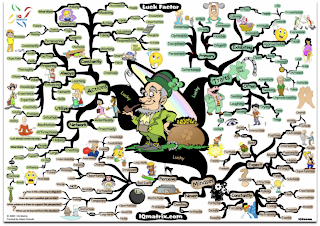
Using the sample image above (of the "Luck Factor Mind Map"), think about how your students could benefit from some of these interpretations (or deciphering them or creating their own)? Check out some mind-maps HERE and download them for free. These maps are good for critical-thinking or analysis practice with visual information.

There's even a "MasterMind Matrix Chart" that "will guide you step-by-step towards success and achievement in any field of endeavor. It makes for an ideal self-coaching tool for any problems or challenges that may stand between you and your life’s objectives." ... Sounds like we all need to follow that!!!

Some good tools for map creation include: Inspiration , Kidspiration (REVS has licenses for these),  Cacoo, or Bubbl.us... plus MANY more you can pay good money for!


Wednesday, February 23, 2011

Take 5! Integration Update - February 23, 2011 (Vol.2/#17)


Issue #17
“Take 5” is a weekly update containing information related to teaching and learning for today and beyond...

Take just 5 minutes (or less) to look over these resources and see what might be helpful for your and/or your students. Better yet, set aside at least 15-30 minutes a week (yes, that's been increased from last year!) to focus on finding resources and ideas that will improve student learning and prepare them for their future!

===================================

Tips and Tools for Teachers

  • Life.com The Power of Historical Images – (Perfect for Black History Month) Begin a discussion with this collection of photos from Life.com — or have students use them to create a presentation or expository piece on a segment of history. Show an image with no captions and have students discuss what they think is going on. So many ideas you can come up with from images here. Getty Images purchased the rights to Life’s photos and has made them available for use at Life.com.  More information can be found at this Edutopia article. (NOTE: The site also includes "Today's Top Photos" on their home page -- watch history being made in the Middle East/North Africa) 
 

  • Flashcards – (see sample quiz item above) From Dictionary.com, create your own study guide or use one already made — works great for vocabulary in any subject, foreign language, or anything else that has one right answer. (Thanks to Kathy Herman, HS, for this tip!)

Ponderings
  • Teacher Blogging or Venting? (article) - PA teacher strikes nerve with 'lazy whiners' blog
    ... If you are a blogger (or know of any teachers who blog in any form), take a quick look at this article and consider the implications. This teacher occasionally used her personal blog to vent her frustration with her students' lack of motivation, and more. She claims "free speech," but even "free" often has hidden costs! Here are some excerpts from the article:
    • "My students are out of control," Munroe, who has taught 10th, 11th and 12th grades, wrote in one post. "They are rude, disengaged, lazy whiners...
    • Munroe did not use her full name or identify her students or school in the blog, which she started in August 2009 for friends and family. Last week, she said, students brought it to the attention of the school, which suspended her with pay.
    •  "She could have been any person, any teacher in America writing about their lives," he said, pointing out that Munroe blogged about 85 times and that only about 15 to 20 of the posts involved her being a teacher. "It's honest and raw and a little edgy depending on your taste. ... She has a deep frustration for the educational system in America."
Learning Opportunities
  • 1. In-District Professional Development Opportunities
  • 2. NWO's STEM Education Inquiry Series (at Rossford High School!) - Thurs., March 24th (from 5-8pm) a low-cost, local opportunity for elementary teachers and JH/HS science, math, and technology teachers offered 7 times from September 23 - April 14, 2011.
  •  3. In the right margin of this blog, enter your email to receive future postings into your email Inbox (Take 5s and more!) -- plan on 1-3 posts per week.

;-) Just for Fun?!?! (and a little learning, perhaps)

Another set of gems from the photos at Life.com... Called "Heavy Stuff on Top of People," this could be used for a science/physics lesson, perhaps? (visuals only, no demonstrations or experiments!) People REALLY did stuff like that back then too, huh? Remember... do NOT try these at home!!!
  

Monday, February 7, 2011

Take 5! Integration Update - February 7, 2011 (Vol.2/#16)


Issue #16
“Take 5” is a weekly update containing information related to teaching and learning for today and beyond...

Take just 5 minutes (or less) to look over these resources and see what might be helpful for your and/or your students. Better yet, set aside at least 15-30 minutes a week (yes, that's been increased from last year!) to focus on finding resources and ideas that will improve student learning and prepare them for their future!

===================================

Tips and Tools for Teachers 

  • NewsMap Ever wish you could see all the news at once? Well, you can (sort of)... Sorted by size, color, and hue, NewsMap represents the current news in several countries (and languages) across the globe in these disciplines: World, National, Business, Technology, Sports, and Health. Great for current events, history in the making, sociology, or even just to see what news event is the most or least popular. (NOTE--this site may take a few seconds to load; may not work on older computers) 
    • The image below shows what was happening Monday, February 7th -- the day after the Superbowl... thus the big area about the Packers' rings! The Egypt crisis has also gotten a lot of press, so that also takes up a larger than normal size on the NewsMap.


  • Big Huge Labs – "Do fun stuff with your photos" or as we educators like to say, "Do educational things with your photos!" A Flickr account allows you to use more of these tools, but some photos can be uploaded. Not all of their tools are educationally adaptable, but here are a few to think about...
    • ID badges for cooperative group roles, "about me" activity, famous/historical people/biographies, shapes information, or book characters... 
    • Image Cubes for review games (topics), similarities and differences, cooperative group roles (roll to get your role!)... or a 
    • Magazine Cover for biographies, project visuals, guest speaker interest poster, portfolio cover, and more!
    • Motivational Poster of whatever you need to say (see above)

Ponderings
  • 10 Things... Before My 1st  Job ... Ever wish someone gave you clear advice about teaching BEFORE you began? (Well, many probably did, but here's some more!) Some of these might be good reminders year after year. From the "So You Want to Teach" blog, here's a sampling:
    1. Get a handle on classroom management early
    2. Have fun
    10. Set aside personal time 
Learning Opportunities
  • 1. In-District Professional Development Opportunities
  • 2. NWOCA's EdTech Training Schedule - learn more and sign up HERE
  • 3. NWO's STEM Education Inquiry Series (at Rossford High School!) - Thurs., February 17th - a low-cost, local opportunity for elementary teachers and JH/HS science, math, and technology teachers offered 7 times from September 23 - April 14, 2011.
  •  4. In the right margin of this blog, enter your email to receive future postings into your email Inbox (Take 5s and more!) -- plan on 1-3 posts per week.
;-) Just for Fun! (and a little learning, perhaps)
 
  • Dotty Dots - An interactive site of colored dots that interact with your mouse pointer or SMART Board touch. Try out the different scatter methods in the lower left. Make your own by entering your text at the top, then copy/paste the URL, like I did with this one.


Thursday, January 27, 2011

Take 5! Integration Update - January 27, 2011 (Vol.2/#15)


Issue #15
“Take 5” is a weekly update containing information related to teaching and learning for today and beyond...

Take just 5 minutes (or less) to look over these resources and see what might be helpful for your and/or your students. Better yet, set aside at least 15-30 minutes a week (yes, that's been increased from last year!) to focus on finding resources and ideas that will improve student learning and prepare them for their future!

===================================

Tips and Tools for Teachers 

  • Got Goals? Try Joe's Goals A public goal-setting site for you and/or your students... for homework/studying goals, fitness, nutrition, or anything else you're trying to improve 
  • SMART Gallery Collections – Looking for more images for your lessons? Search and download new gallery collections for SMART Notebook at SMART Exchange. (This is updated regularly, so return to this link every month or two to see what SMART has added 


Ponderings
  • Kids Today - Here's one perspective... from AVG, so the results (or survey pool of respondents) might be a bit skewed, but it gives some food for thought... or pondering... Some highlights:
    • Children on average have an online footprint by the time they are six months old.
    • More young children know how to play a computer game (58%) than swim (20%) or ride a bike (52%)
    • 28% of young children can make a mobile phone call, but only 20% know to dial 911 in case of an emergency
    • 69% of children aged 2-5 can operate a computer mouse, but only 11% can tie their own shoelaces 
Learning Opportunities
  • 1. Ohio FreeTech Conference (hosted by SmartEd Services) - It's FREE and held in "Toledo" (Sandusky) (Jan. 25 & 26), Cincinnati (Feb. 2 & 3), Columbus (Feb. 9 & 10), and Cleveland (Feb. 17 & 18). Ashland grad credit is also offered. See the sessions HERE.
  • 2. Apply for National Board Certification by Jan 31st - Go HERE
  • 3. Ohio eTech Conference (Columbus, OH) January 31 - February 2
  • 4. NWO's STEM Education Inquiry Series (at Rossford High School!) - Thurs., February 17th - a low-cost, local opportunity for elementary teachers and JH/HS science, math, and technology teachers offered 7 times from September 23 - April 14, 2011.
  •  5. In the right margin of this blog, enter your email to receive future postings into your email Inbox (Take 5s and more!) -- plan on 1-3 posts per week.

;-) Just for Fun! (and a little learning, perhaps)

  • Need some R & R? Try doing nothing for 2 minutes! No, really... ABSOLUTELY NOTHING... give it a try at "Do Nothing for 2 Minutes" -- How did you do?
SPECIAL NOTE... this site was just one of MANY new things I learned about while at the Ohio Free-Tech Conference over the last two days. More info will be coming about some great ideas and resources that presenters shared. Eventually, presenter's resources will be posted online and I'll leave a link to those as well. If you can, try to make one of the 3 other Free-Tech Conferences over the next few weeks or even the Ohio eTech Conference in Columbus, OH next week!  


iPad Switch - Lock Position to Mute


The switch on the side of the iPad used to lock the screen in either portrait or landscape position so it doesn’t flip-flop back and forth. As of the iOS 4.2 upgrade, the switch now acts as a mute switch to quickly turn off sounds. Both are fabulous features, of course, but how do you now lock your screen position, you ask? Here’s how... From Apple Support:

Use the following steps to enable screen rotation lock: 
  1. Rotate iPad so the display is in the desired orientation.  
  2. Double-click the Home button to display recently used apps.
  3. Flick from left to right along the bottom of the screen.  
  4. Tap the rotation lock button on the bottom left of the screen.  
  5. A padlock will appear in the rotation lock button.
Enjoy your new-found stability!

Thursday, January 20, 2011

Take 5! Integration Update - January 20, 2011 (Vol.2/#14)


Issue #14
“Take 5” is a weekly update containing information related to teaching and learning for today and beyond...

Take just 5 minutes (or less) to look over these resources and see what might be helpful for your and/or your students. Better yet, set aside at least 15-30 minutes a week (yes, that's been increased from last year!) to focus on finding resources and ideas that will improve student learning and prepare them for their future!

===================================

Tips and Tools for Teachers 
  • Create Animations with Do Ink Have students animate a scientific process, narrate a story, or review math problems... or whatever else you or they think of! There's even a "Bazaar" that houses images or "Props" you can use... many are free, but some are for a fee.
  • Mac Tip: Screen Capture Image – I've been using the keyboard keys (Apple or Command + Shift + 4) to select an image or screen shot of various things to show teachers something, make a graphic for a test, worksheet, or project sample, or even to use on a web page. (NOTE: You can also use these keys... "Apple or Command + Shift + 3" to take a full shot of the entire page). These processes are nice, but each time, it will create a Picture file on your desktop. If you know you won't need to save that screen shot for later, consider this tip from Apple themselves -- it allows you to just Copy, then Paste the screen shot! Yeah!!! (Just add a 4th key, the Control key... Control+Command+Shift+3 (or 4)

  • Productivity Tip: Switch Quickly Between Programs – on a Mac or Windows PC, you can quickly switch between programs by using 2 keys and cycle through all open programs to quickly get to the one you want. 
    • On Windows/PC - press Alt+Tab (hold down Alt, then press Tab key once or several times to cycle through, letting go on the one you want) - VIDEO of this
    • On Mac - press Command(or Apple)+Tab (hold down Command, then press Tab key once or several times to cycle through, letting go on the one you want)

Ponderings
Learning Opportunities
  • 1. Ohio FreeTech Conference (hosted by SmartEd Services) - It's FREE and held in "Toledo" (Sandusky) (Jan. 25 & 26), Cincinnati (Feb. 2 & 3), Columbus (Feb. 9 & 10), and Cleveland (Feb. 17 & 18). Ashland grad credit is also offered. See the sessions HERE.
  • 2. Apply for National Board Certification by Jan 31st - Go HERE
  • 3. NWO's STEM Education Inquiry Series (at Rossford High School!) - Thurs., February 17th - a low-cost, local opportunity for elementary teachers and JH/HS science, math, and technology teachers offered 7 times from September 23 - April 14, 2011.
  •  4. In the right margin of this blog, enter your email to receive future postings into your email Inbox (Take 5s and more!) -- plan on 1-3 posts per week.

;-) Just for Fun! (and a little learning, perhaps)
  • Educational Jargon - NBCT Roxanna Elden recently wrote a post on EdWeek that may enlighten some to our world. At the very least, may make us all think carefully about the words we use and the true intention of those words. Here's the article: 5 Words and Phrases that Sound Different to Teachers and a few highlights:  
--> "Failure is not an option": Actually, failure IS an option...
--> "Paradigm Shift"... Here are some moments in history that might be appropriately described as paradigm shifts:
"Lo and behold, Copernicus, you might just be right about the whole 'Earth orbiting the sun' thing. Sorry I called you a heretic. No hard, feelings, right?"

Tuesday, January 11, 2011

Take 5! Integration Update - January 11, 2011 (Vol.2/#13)


Issue #13
“Take 5” is a weekly update containing information related to teaching and learning for today and beyond...

Take just 5 minutes (or less) to look over these resources and see what might be helpful for your and/or your students. Better yet, set aside at least 15-30 minutes a week (yes, that's been increased from last year!) to focus on finding resources and ideas that will improve student learning and prepare them for their future!

===================================
HAPPY 1-11-11-11-11 (one less 1 than in November later this year!)
===================================
Tips and Tools for Teachers 
  • Scribble Maps (Thanks, Shelley B.) - A "quick and easy way to create and share maps"... including being able to write (or scribble) on them! More “how to” and samples at their blog - http://scribblemaps.blogspot.com/  And there's WOW maps too! (World of Warcraft) 
    • Math Playground – A site full of quick review games and online practice for elementary and middle school math. One negative... lots of ads, but some good, free tools/practice otherwise. The image below is just one area... of many!


    Ponderings
    Learning Opportunities
    • 1. In-District Professional Development Opportunities - COMING SOON!
    • 2. Ohio FreeTech Conference (hosted by SmartEd Services) - It's FREE and held in "Toledo" (Sandusky) (Jan. 25 & 26), Cincinnati (Feb. 2 & 3), Columbus (Feb. 9 & 10), and Cleveland (Feb. 17 & 18). Ashland grad credit is also offered. See the sessions HERE.
    • 3. NWO's STEM Education Inquiry Series (at Rossford High School!) - Thurs., January 13th - a low-cost, local opportunity for elementary teachers and JH/HS science, math, and technology teachers offered 7 times from September 23 - April 14, 2011.
    •  4. In the right margin of this blog, enter your email to receive future postings into your email Inbox (Take 5s and more!) -- plan on 1-3 posts per week.

      ;-) Just for Fun! (and a little learning, perhaps)
      This one should really be under the heading "Learning, Fun, & Serendipity." Learn things you never thought you needed to know (or never knew you were even missing) from the Instructables website. Share some with your students and see what they come up with -- for cooking, outdoors, organization, health, and more! Here are a few samples:
      Add a snuggle-tight pocket to a binder:
      http://www.instructables.com/id/Duckduct-tape-Folder-Book-Pocket/

      Re-purpose that old whisk:
      http://www.instructables.com/id/Multi-purpose-holder-from-kitchen-whisk/

      Cheap iPad cover/holder:
      http://www.instructables.com/id/iPad-Notebook-Safe/

      For your New Year’s resolution to exercise AND work more:
      http://www.instructables.com/id/Fancy-Ikea-Treadmill-Desk/

      Snow sculpting idea for our next big snow:
      http://www.instructables.com/id/SpongeBob-SquarePants-Snow-Sculpture-in-Color/


      Monday, January 10, 2011

      Cleaner Simpler YouTube Viewing

      These sites present YouTube videos with less or even no clutter... 

      YouTube XL
      -- Just a larger version with less clutter (from YouTube themselves); still shows some related videos on the side... Not sure if “inappropriate ones” will still show up or not (I didn’t know what to try to test it!)


      quietube - (follow directions at this site)
      -- Add the box to your bookmark/favorites tab, then click it to view YouTube as a “QUIETube” -- Watch this video (1 min.) to see exactly what quietube does.

      Thursday, December 9, 2010

      Take 5! Integration Update - December 9, 2010 (Vol.2/#12)


      Issue #12
      “Take 5” is a weekly update containing information related to teaching and learning for today and beyond...

Take just 5 minutes (or less) to look over these resources and see what might be helpful for your and/or your students. Better yet, set aside at least 15-30 minutes a week (yes, that's been increased from last year!) to focus on finding resources and ideas that will improve student learning and prepare them for their future!

      ===================================

      Tips and Tools for Teachers 
      • Office Templates Remember that you have access to thousands of pre-made templates you can use in Word, PowerPoint, and Excel! Many for educational uses such as letters, calendars, quizzes & tests, tournament brackets (very important in March), and more!
        • Kahn Academy – Looking for thousands of FREE video tutorials.... Math, science, history, brain teasers, and more! These videos are ALL done by ONE person (Sal Kahn). Read more about him and this project HERE or visit his YouTube Channel.


        Ponderings
        • Stress & Burnout? - Take the Burnout Self Test
          ... This time of year can really take a toll on teachers, especially with the holidays! So take a moment to see if you're heading toward burn-out (or already there). If so, take the necessary steps to help yourself de-stress a bit... from deep breaths to more intense relaxation. See more tips HERE.

        Learning Opportunities
        1. In-District Professional Development Opportunities - COMING in January!
        2. Global Education Conference (online) Recordings of sessions can be found HERE ... lots of great sessions dealing with a global perspective in teaching & learning. Click for SESSIONS
        3. NWO's STEM Education Inquiry Series (at Rossford High School!) - Thurs., Dec. 16th - a low-cost, local opportunity for elementary teachers and JH/HS science, math, and technology teachers offered 7 times from September 23 - April 14, 2011.
        4. In the right margin of this blog, enter your email to receive future postings into your email Inbox (Take 5s and more!) -- plan on 1-3 posts per week.

        ;-) Just for Fun! (and a little learning, perhaps)
        In case you haven't seen these... here's some "bookish" humor on opposite sides of the technology issue...

        • It's a BOOK! - A kids book that is a little TOO REAL these days! (thanks Shelley B. for sharing this one!)
        • Medieval Help Desk - Technologies have been around for a LONG time... here's one from the "olden days"

          2010 Top 5 Tech Gifts for Teachers this Holiday

          In ascending order of cost, here is a list of technology “must have” tools for most teachers:

          1) USB flash drive(s) - from 128-256MB to 1-8GB... Most teachers will only need about 1-2 GB for file transfers at the most, but these are harder to find lately. On sale, a 4GB flash drive can be $10-20 or less... And get a couple—one for things around the classroom and one you carry with you to home, school, conferences, etc. [Why do I even mention the SMALL flash drives (less than 1GB)? I use them often to quickly attach to keyboard USB ports rather than the awkward or hard to reach USB ports in some desktop computers. The larger, 1-4+GB, drives usually require direct connection to a computer/laptop for power.]

          2) Digital Voice Recorder w/ USB connection, ideally (~$30-$200+) – Sample uses: for notes or reminders to yourself during the day (these are small enough to carry with you), record student presentations so they can hear how they did without the distraction of seeing themselves with video images (or use in conjunction), foreign language teachers/students can record their voice (assessments) or authentic speakers for examples, record guest speakers or field trip experts (with permission, of course), record instructions and put on a website or CD for students; and/or recording a meeting for more accurate minutes or a professional development session to review ideas over and over (again, with permission, of course). 
          Meeting most teachers’ needs, a digital recorder can hold from 50 to over 500 hours of conversations, reminders, or even more. But look for one that has “folders” so you can easily organize your recordings beyond the time/date stamp. Each recording becomes a separate file, so they are easily transferred to your computer or a CD for backup or storage and they can be easily deleted to free up more memory. Perhaps most importantly, check that it records in a format your computer can play — Mac (.mp3 or .wav, with a converter); PC/Win (.wav) In my opinion, this is an incredibly underutilized tool that could assist most teachers (and principals, too) in some way or another.

          3) Digital Camera – aka “point-n-shoot” (one that does pictures and video) - Flip video cameras are all the rage around holiday time, but they are limited in what you can do for pictures and video... But they’re GREAT for quick video clips, if that’s all you need. For more versatility, find a camera that does decent pictures (at least 6 megapixels... Most point-n-shoots are up to 12 or 14 mpixels now) and at least 720 (partial HD) video. And, yes, you could use your smart phone for pictures and video, but again, like the Flip cameras and clones, you’re limited on zoom, flash power, and features like macro (close up focusing).

          Cost: from $60 (on sale) - $120 for a decent starter, but can go up to $200-300+, but most don’t need all those megapixels and/or features. If anything, remember this FACT: when it comes to megapixels, MORE is NOT better! ENOUGH is BEST! Many decent cameras are available now for around $100... Which is a pair of shoes for some of us! :-)

          (NOTE: If you’re only using pictures for computer projects or web site posting, etc., a 1-3 megapixel image is more than fine; if you’ll be printing 4x6s or 8x10s, then go to 5-8 megapixel camera/images; but if you’ll be printing 20x30 wall hangings/pictures or doing detailed editing and adjusting in Photoshop, then YES, you’ll need the 12-14+ megapixel camera! And, if you plan on taking a picture for a billboard (yes, those big things along highways), skip the point-n-shoot cameras and go get a DSLR with at least 15 megapixels.)

          Be sure to also get at least a 2MB memory card with your camera purchase! Most cameras do not come with one. Nor do most come with a case anymore, so seek one of those out, too, if one is not included (check the camera box; some have a “baggie,” but not case). One at from a grocery store for $7-12 will do just fine... No need for paying much more than that.

          4) iPod Touch - ($200-$399) - This versatile device, right out of the box, can now... Connect to your email account(s), take video with simple editing tools, store/organize music, ebooks, pictures, movies, TV shows, voice memos, video chat, and even make phone calls (but that requires a separate app!). So, basically ignore #1, 2, and 3, if you can get an iPod Touch! This doesn’t even include the hundreds of thousands of apps you can find to use on the Apple App Store (through iTunes). There are thousands of education-friendly or productivity apps that can help teachers and/or students. All you need is time to explore or let your students find some!

          5) Projector – (about $400-700; careful with cheaper versions... See here for the Discovery example - http://bit.ly/hvezYC ) Connect your computer (desktop or laptop) to the projector to SHOW your students what you are learning about... Not just talk about it. Add speakers and also let them HEAR it, too! Historical speeches or events, scientific processes or animations of things we can’t see, but have evidence for, math problems worked out while talking through the process (play a recording/video) as you work with students individually. Add some video or images you or the students took with your digital camera (see #2 above), and you have even more to show/use on your projector. Plus, a DVD or VCR can also be attached to the projector to show those videos larger and more effectively than a 28-36 inch TV screen with glare!

          Misconception – you DON’T need an interactive white board to use a projector in your classroom... Just a screen or white wall (or a strip or two of white bulletin board paper works just fine!)
          Lastly, look for sales in your weekly office (Office Depot, Staples, OfficeMax, etc.) or electronics (Best Buy, even Target) store flyers for many of these items or check out online stores/sites such as Amazon, Circuit City, or CompUSA (yes, these two live primarily/only on the internet, respectively).
          Teachers: leave comments below on some of your favorite tools from the above list or add more of your own!
           

          Monday, November 29, 2010

          Qwiki- An Information Experience

          Watch this 6 minute video to learn more about a newly developed (and developing...) website for computer-generated "information experiences"... It's still in "alpha" (or early development), but you can sign up to help make it better - go to the Qwiki site